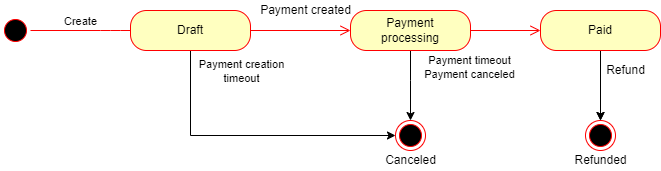
Orders
Overview
The preconditions for creating an order are:
- The event for which the order is created needs to be published
- The sale needs to have started for all ticket configs in the order( their
start_sale_atdate is in the past ) - The user needs to be logged in, as an authorized user or guest user.
Once an order is created, you need to create a payment for it. If the order only contains free tickets, it is immediately confirmed. Otherwise, you get a payment intent for Stripe which you will need to use to complete the payment.
Once the payment is complete, an email confirmation will be sent to the user.
pdf and pkpass tickets will be sent in the confirmation email.
Optionally, tickets can also be directly downloaded. secure tickets will show up in the user's wallet.
Creating an order
To create an order for an event you need to call POST event/v1/order with the following fields:
order_itemis a list of order items. A single order item contains n tickets of the same kind (ie. 3 VIP tickets). See details in this section.formatcontains the formats in which the tickets for the order need to be deliveredhold_tokenis optional, used in case the event has a seating chart. This is the hold token from seats.io, obtained from their seating chart object. It reserves a set of seats for a customer. When it isn't provided, the seats might still get booked if they are free at the moment of payment creation. If not, creating a payment will fail.
curl -X POST
    --header 'Content-Type: application/json'
    --header 'Authorization: Bearer $JWT'
    -d '{"orderItem": [{"quantity": 4, "ticket_config_id": 7489}], "format": "PDF"}'
    'https://tickethead.api.tickethead.io/event/v1/order'

curl -X POST
    --header 'Content-Type: application/json'
    --header 'Authorization: Bearer $JWT'
    -d '{"first_name": "John","last_name": "Doe","email": "[email protected]"}'
    'https://tickethead.api.tickethead.io/event/v1/order/$ORDER_ID/order_contact'
import { SDK, BaseUrl } from 'tickethead-sdk'

const sdk = await SDK.build({
    baseUrl: BaseUrl.ThProd, // Change this appropriately
})

// Authorize user
const credentials = new PasswordCredentials({"username": "johndoe", "password": "SuperSecret123@"})
await sdk.authorize(credentials)
// or as a guest
// await sdk.authorize();

const order = await sdk.order.createOrder({
    orderItem: [
        {
            quantity: 4
            ticketConfigId: 7489
        }
    ],
    format: 'PDF',
    orderContact: {
        firstName: 'John',
        lastName: 'Doe',
        email: '[email protected]'
    }
})
Order items
An order item contains several tickets of the same type, sector and timeslot. Required fields:
quantity: the number of tickets with this configurationticket_config_id: to which ticket config do the tickets belong to- If the event has a seating chart, you also need to provide
selected_seatsas an array of string seat identifiers. The length of the array must match thequantityof seats. For example,['A-1','A-2']andquantity: 2. timeslot_iddetermines to which timeslot the tickets belong if the event has timeslotssector_iddetermines to which sector the tickets belong if the event has sectorsticket_discountis a list of discount IDs to apply to this order item
Creating a payment
To create a payment intent for an order, call POST payment/v1/payment with the appropriate order_id. We currently only support Stripe as a payment provider.
curl -X POST
    --header 'Content-Type: application/json'
    --header 'Authorization: Bearer $JWT'
    -d '{}'
    'https://tickethead.api.tickethead.io/payment/v1/payment?order_id=1234&type=card'
await sdk.payment.createPaymentIntent({
    orderId: 1234,
    type: 'card'
})
If you do not specify a payment type, it defaults to card.
If all the tickets in the order are free, the order will be immediately confirmed.
In the response you will get the Stripe publishable_key and the client_secret for the payment.
You can use this with Stripe elements to complete the payment. Afterwards, the order will be confirmed.
Getting the tickets
After the order is confirmed, tickets are delivered in 2 ways:
pdfandpkpasstickets are sent in the confirmation email.securetickets are delivered to the user's wallet.
PDF and pkPass tickets can be downloaded from GET event/v1/order/:order_id/download_tickets
curl -X GET
    --header 'Content-Type: application/json'
    --header 'Authorization: Bearer $JWT'
    'https://tickethead.api.tickethead.io/event/v1/order/$ORDER_ID/download_tickets'
const pdfBinary = await sdk.order.downloadTickets({ orderId: 1234 })

// Save the binary as PDF file on your system using Blob or saveAs browser method
All the tickets are associated with the user on the blockchain. Tickets in the wallet can be transferred to another user via the app.
Order flow